
A website isn’t finished when it launches. WordPress, its plugins and its theme all need regular updates, the site needs backing up, and someone has to notice when something breaks. This guide explains what website maintenance covers, what it costs in the UK in 2026, what 53Marketing charges, and how to decide whether to pay for it or do it yourself.
The short answer
- Doing it yourself: mainly your time, plus hosting from a few pounds a month and a domain name at usually under £20 a year.
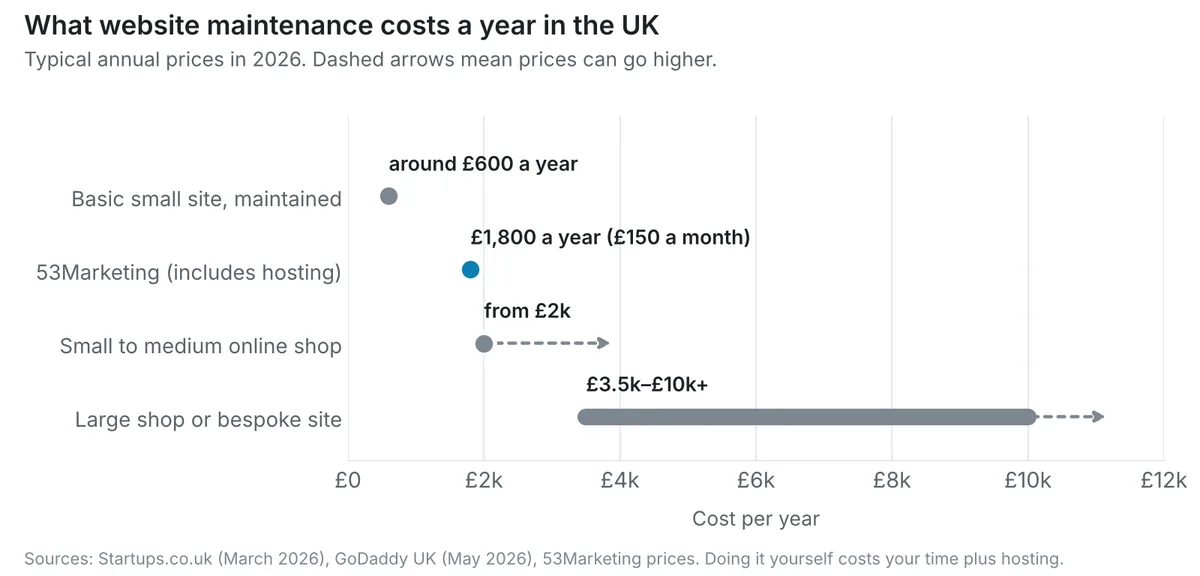
- A basic small business site maintained for you: around £600 a year is a typical figure, and more if hosting and support are included.
- Online shops: from around £2,000 a year for a small to medium shop, and more for large ones.
- 53Marketing: £150 a month for hosting, security updates, a monthly backup and support, on a month-to-month basis.
The market figures come from two recent UK guides, listed in the sources at the end. Packages vary a lot in what they include, so compare what’s covered, not just the monthly price.
What website maintenance covers
- Software updates: keeping WordPress, plugins and the theme up to date. Most WordPress security problems come from software that hasn’t been updated.
- Backups: regular copies of the site, stored somewhere safe, so it can be restored if something goes wrong.
- Security: watching for problems and dealing with them before they affect your visitors.
- Hosting: the server your website runs on. Some packages include it; others expect you to arrange your own.
- Support: someone to contact when something stops working, such as a contact form that stops sending.
- Small changes: some packages include a few content edits each month; many charge for them separately.
What maintenance costs in the UK
| Option | Typical cost | What you usually get | Good fit if |
|---|---|---|---|
| Do it yourself | Your time, plus hosting from a few pounds a month | Whatever you do: updates, backups and fixes are your responsibility | You’re comfortable in WordPress and will actually do it every month |
| Basic maintenance for a small site | Around £600 a year | Updates and backups, sometimes support; hosting may be extra | You have a simple brochure site and want the essentials covered |
| Small to medium online shop | From around £2,000 a year | More frequent backups and updates, and checks on checkout and payments | You sell online and can’t afford the shop going down |
| Large shop or bespoke site | From around £3,500 to £10,000+ a year | Dedicated support, monitoring and development time | Your site is complex or business-critical |
On top of maintenance, budget for the domain name (usually under £20 a year), hosting if it isn’t included, and any paid plugins or apps your site depends on.
What 53Marketing charges
53Marketing’s hosting and maintenance package is £150 a month. It covers website hosting, security updates and one monthly backup, with support from 53Marketing as part of the managed arrangement. If you need more frequent backups, that can be factored in. It runs month to month, with 30 days’ written notice to cancel. 53Marketing isn’t VAT registered, so there’s no VAT on top.
That’s £1,800 a year, more than a basic update-only plan, because it includes hosting and support from the person who built the site rather than a separate provider. If you also want steady SEO work, SEO Lite combined with hosting and maintenance is £395 a month, which saves £50 a month on buying both separately. For build prices, see our guide to how much a website costs in the UK. For SEO prices, see how much SEO costs in the UK.
Moving an existing site onto 53Marketing hosting, and fixing any problems already on it, is reviewed and quoted separately. You don’t have to use the package: a site built by 53Marketing is yours to host and maintain yourself if you prefer.
What happens if you skip maintenance
Nothing, for a while. Then problems tend to arrive together:
- Security holes. Outdated plugins are a common way into WordPress sites. A hacked site can be flagged by Google or browsers, and cleaning it up costs far more than maintenance would have.
- Things quietly break. A contact form can stop sending messages and nobody notices until customers mention it.
- Updates get harder. Leave a site a year or two and updating it becomes a repair job, sometimes a rebuild.
- No way back. Without recent backups, a serious problem can mean losing pages, content or orders.
Doing it yourself: a monthly routine
If you’d rather look after the site yourself, set aside half an hour each month:
- Take a full backup and check you can access it.
- Update WordPress, then plugins and the theme, one at a time.
- Check your main pages on a phone and a computer.
- Send a test message through every form, and check it arrives.
- Remove plugins you no longer use.
- Check Google Search Console for errors or security warnings.
- Make sure your domain name and hosting are set to renew.

If an update breaks something and you’re not sure how to fix it, restore the backup and get help before trying again.
Questions to ask before you sign up
- Is hosting included, or do I need to arrange it separately?
- How often are backups taken, where are they stored, and how quickly can the site be restored?
- Are content changes included, and if not, what do they cost?
- What happens if the site is hacked or goes down?
- Is there a minimum term, and how much notice do I need to give to cancel?
- Does the price include VAT?
- If I leave, will I get full access to my website, domain and files?
Common questions
Do I need to pay for website maintenance?
Not necessarily. Someone needs to do it, but that can be you. Paying makes sense when you don’t have the time, the site is important to your business, or you’d rather have one person to call when something goes wrong.
How often should a WordPress site be updated?
At least once a month, and sooner when an important security update is released. Take a backup before every round of updates.
Is hosting the same as maintenance?
No. Hosting is the server your site lives on. Maintenance is the work of keeping the site itself updated, backed up and working. Some packages include both, so check which you’re getting.
Can I switch maintenance provider later?
You should be able to. Make sure you own your domain name and can get full access to the website and its files. Any move between hosts should be planned so the site isn’t offline for long.
Talk to 53Marketing about looking after your site
Whether 53Marketing built your website or not, you can ask about hosting and maintenance. You’ll get a straight answer on whether the package suits your site, and what moving it would involve.
See website prices, hosting and maintenance →
Sources
- GoDaddy: How much does it cost to build a website in the UK? (May 2026)
- Startups.co.uk: How much does a website cost? (updated March 2026)