

Google Ads lets you pay to appear at the top of Google when people search for what you sell, and you pay only when someone clicks. For a small UK business, the simplest way to start is one Search campaign with a handful of specific keywords, tight location targeting, conversion tracking, and a budget you can afford to test for a month.
This guide walks through that setup step by step, using my own campaign as the example: a small search campaign for website design in Northern Ireland that I launched in October 2026 on £3.28 a day.
Updated 14 October 2026: rewritten for UK small businesses, with 53Marketing’s own campaign as a worked example and links to Google’s documentation.
How Google Ads works
Every time someone searches, Google runs an auction among advertisers whose keywords match. It doesn’t simply pick the highest bid: it weighs your bid alongside the quality of your ad and landing page and the context of the search. A relevant ad with a sensible bid can beat a bigger budget.
You’ll see a Quality Score from 1 to 10 next to each keyword. Google says it’s based on expected click-through rate, ad relevance and landing page experience, and that it’s a diagnostic tool: “Quality Score isn’t an input in the ad auction” (Google Ads Help). Use it to spot weak ads or landing pages, not as a target in itself.
Google Ads can also show ads on websites, YouTube, Gmail and Maps. For a first campaign, stick to Search: you’re reaching people at the moment they’re looking for what you offer, and it’s the easiest to measure.
What it costs
You set an average daily budget. On busy days Google can spend up to twice that, but over a month you won’t be charged more than 30.4 times your daily budget (Google Ads Help). So £3.28 a day means at most about £100 a month.
How many clicks that buys depends on your keywords. Local, specific searches are usually far cheaper than broad ones:
| Search | Estimated cost per click |
|---|---|
| accountant | £7.98 |
| plumber | £6.46 |
| web design derry | £2.51 |
| boiler service belfast | £2.41 |
| emergency plumber belfast | £2.39 |
| plumber belfast | £2.09 |
| solicitor portadown | £1.64 |
| plumber derry | £1.18 |
As a rough guide, at £2.50 a click, £100 a month buys about 40 clicks. If 1 in 10 of those visitors gets in touch, that’s four enquiries. Whether that’s worth it depends on what a customer is worth to you, which is why the first month is a test, not a commitment.
Setting up your first campaign
1. Create your account and set up conversion tracking first
Sign up at ads.google.com with the Google account you use for your business. Before you spend anything, set up conversion tracking so Google Ads records when someone sends an enquiry form, calls you from an ad or books online. Without it, you can see clicks but not whether they turned into customers.
If you use Google Analytics 4, link it to Google Ads and import your enquiry event as a conversion. Check it works by sending a test enquiry yourself.
2. Choose a Search campaign
Create a new campaign, choose your leads goal and pick Search. In the network settings, make sure only the Google Search Network is selected unless you’ve decided you also want display ads on other websites.
3. Set your location, and choose “Presence”
Enter the area you serve: a county, a radius around your town, or Northern Ireland as a whole. Then open the location options. The default, Presence or interest, also shows ads to people elsewhere who have shown interest in your area. Presence shows ads only to people who are in, or regularly in, your locations (Google Ads Help). If you can only serve local customers, Presence avoids paying for clicks from people who can’t buy from you.
4. Set a budget and bidding strategy
Pick a daily budget you’re comfortable spending for at least a month. For bidding, a new account has no conversion history for Google’s automated bidding to learn from. Maximise clicks with a maximum cost-per-click limit is a simple way to start: Google tries to “get as many clicks as possible within your budget” (Google Ads Help) without paying more than your limit for any one click. Once you’ve built up some conversions, you can test a conversion-based strategy.
5. Choose keywords and match types
Start with 5 to 15 keywords that describe exactly what you sell and where. The match type controls how closely a search has to match your keyword:
| Match type | How you enter it | Ads can show on searches… | Good for |
|---|---|---|---|
| Exact | [web design derry] | with the same meaning or intent as the keyword | Tight control on a small budget |
| Phrase | “web design derry” | that include the meaning of the keyword | Catching variations like “affordable web design derry” |
| Broad | web design derry | related to the keyword, which can include searches without its direct meaning | Larger budgets with conversion-based bidding |
On a small budget, start with phrase and exact match. Broad match can find searches you hadn’t thought of, but it can also spend a small budget on searches that will never turn into customers. Google may recommend broad match or its AI-based search features; it’s fine to test those later, once you know what a good click looks like for you.
Add some negative keywords from the start to block searches you don’t want, such as “jobs”, “course”, “free” or “template”.
6. Write your ads
Search ads are built from several headlines and descriptions that Google mixes and matches. Write headlines that include your service and area, a reason to choose you (a price, a guarantee, how quickly you respond) and a clear next step. Add your phone number, sitelinks to key pages and your business logo.
7. Send clicks to the right page
Send people to the page that matches their search, not your homepage. It should repeat what the ad promised, show prices or what’s included, and make it easy to call or enquire on a phone. For my campaign, I built a dedicated landing page for website design enquiries in Northern Ireland, with a short form and the same message as the ads.
Worked example: my own campaign
Here’s how I set up 53Marketing’s first search campaign, launched on 14 October 2026:
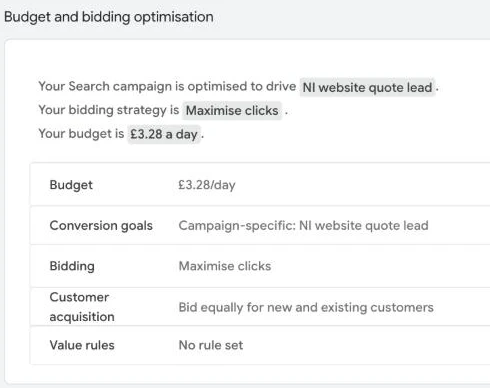
| Setting | What I chose | Why |
|---|---|---|
| Campaign type | Search, Google Search Network only | Reach people actively looking for a web designer |
| Location | Northern Ireland, Presence | Only pay for clicks from people who are here |
| Budget | £3.28 a day (up to about £100 a month) | A small, fixed test |
| Bidding | Maximise clicks, £3 maximum per click | No conversion history yet; the cap stops expensive clicks eating the budget |
| Keywords | 10, all phrase or exact match | Control over which searches trigger the ads |
| Conversion goal | NI website quote lead (form submissions) | Measure enquiries, not just clicks |
| Landing page | A dedicated NI website design page with a quote form | Matches what the ads promise |
The £3 limit is a trade-off. This chart shows Semrush’s estimated cost per click for the keywords in the campaign:
Only “web design derry” is typically below the cap. For the Northern Ireland-wide terms, a £3 limit means I’ll win fewer auctions and appear less often, but every click stays affordable. I paused “web designer near me” because, at around £8.82 a click, three clicks would use a whole day’s budget. After the first month I’ll look at which searches actually brought enquiries and adjust the cap and keywords from there. I’ll add the results to this article.
Your first month: what to check
- Weekly: the search terms report. It shows the actual searches that triggered your ads. Add irrelevant ones as negative keywords.
- Weekly: conversions. Are enquiries being recorded? If you’re getting clicks but no enquiries, look at the landing page before the ads.
- Don’t change everything at once. A new campaign shows “Learning” for a while. Make one change at a time so you can tell what made a difference.
- Review recommendations before applying them. Some suggestions raise budgets or broaden targeting. Make sure each one suits your goals, and check whether auto-apply is turned on in the Recommendations settings.
- After a month: compare cost per enquiry with what a customer is worth. That’s the number that tells you whether to carry on, change course or stop.
Common beginner mistakes
- Launching without conversion tracking, so there’s no way to tell if it’s working.
- Leaving location set to “Presence or interest” when you can only serve local customers.
- Using broad match on a small budget with no negative keywords.
- Sending every click to the homepage.
- Judging the campaign after a few days. Give it at least a month.
Ads or SEO?
Ads bring visits the day you switch them on and stop the day you switch them off. SEO takes months but keeps working. Many small businesses use a small ads budget to get enquiries now and to learn which searches convert, while their website builds up in the free results. My small business SEO guide and guide to finding easier keywords cover the SEO side, and the keyword research works for both.
If you’d like a hand setting up a small, measurable campaign or a landing page for it, get in touch. For the organic side, see SEO services in Northern Ireland.
Sources
- Google Ads Help: About Quality Score for search campaigns
- Google Ads Help: About overdelivery and your average daily budget
- Google Ads Help: About advanced location options
- Google Ads Help: About Maximise clicks bidding
- Google Ads Help: About keyword matching options and About negative keywords
- Google Ads Help: About conversion measurement
- Semrush keyword data, UK database, October 2026; 53Marketing’s Google Ads account