

The way to get more Google reviews is simple: ask every customer, at the end of the job, with a direct link that takes them straight to the review box. Then reply to every review you get. That’s a 15-minute weekly habit, not a marketing campaign.
What has changed is the rules. Google has always banned fake and paid-for reviews. Since April 2025, UK law does too: the Digital Markets, Competition and Consumers Act 2024 bans fake reviews and hidden incentives, and the Competition and Markets Authority (CMA) has published guidance on what businesses can and can’t do. This guide covers the system I recommend to clients in Derry/Londonderry and across Northern Ireland, and keeps you on the right side of both.
Updated 14 October 2026: rewritten to reflect Google’s current review policies and the CMA’s fake reviews guidance.
Why Google reviews matter for local businesses
When someone searches “plumber near me” or “café Bangor”, Google usually shows a map with three businesses above the normal results. Your star rating and review count sit right there next to your name.
Reviews help in two ways:
- They can help you show up. Google’s own guidance on local ranking says “more reviews and positive ratings can help your business’s local ranking” (Google Business Profile Help). Reviews are one factor alongside relevance, distance and how well known you are, not a magic switch.
- They help you get chosen. Once you’re on the screen, people compare ratings, read a few recent reviews and pick. A business with 30 detailed, recent reviews is an easier choice than one with 4 from 2021.
Google doesn’t say how much the age of your reviews matters for ranking, but customers notice the dates. A steady trickle of new reviews shows you’re still trading and still doing good work.
How many reviews do you need?
There’s no fixed number. What matters is how you compare with the businesses you’re competing against in your area. To find your target:
- Search for your main service and town, for example “electrician Newry” or “café Derry”.
- Note the review count, star rating and date of the newest review for the three businesses in the map.
- Make your first goal matching the lowest of the three, then work towards the top.
In a busy Belfast category that might mean a long climb. In a smaller town it might only take a few months of asking consistently.
Step one: get your direct review link
Your Google Business Profile has a short link that opens the “write a review” box directly, so customers don’t have to search for you. To find it:
- Sign in to the Google account that manages your Business Profile.
- Search Google for your business name. Your profile’s management panel appears at the top.
- Click Ask for reviews.
- Copy the review link, or use the Email, WhatsApp and Facebook buttons to share it directly.
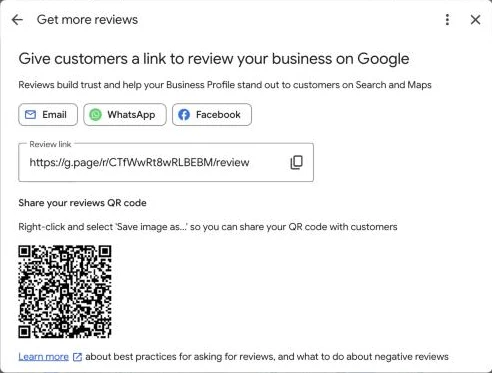
Right-click the QR code to save it, then put it on receipts, invoices, a card at the till or the back of a business card. Save the link in your phone’s notes and share it with your team so everyone uses the same one.
Then add the link wherever customers already hear from you:
- Email signature: “Happy with our work? A quick Google review helps other local people find us: [link]”
- Invoices and receipts: one line at the bottom, or the QR code.
- Follow-up texts or WhatsApp messages after a job or appointment.
- The thank-you page on your website after someone books or buys.
What’s allowed and what isn’t
Two sets of rules apply. Google’s policies decide what stays on your profile, and Google can remove reviews or restrict your profile if you break them. UK consumer law, enforced by the CMA, applies to how you get and use reviews anywhere. Here’s how the common tactics stand:
| What you might do | Google’s rules | UK law (CMA guidance) | Verdict |
|---|---|---|---|
| Ask every customer for a review | Allowed | Allowed. Simply inviting customers to leave a review “is not prohibited”. | Do it |
| Reply to reviews, good and bad | Encouraged | Fine | Do it |
| Suggest they mention the service and the town | No rule against it | Fine, as long as the review is their own words and experience | Fine, keep it light |
| Only ask customers you think are happy | Not allowed: no selectively asking for positive reviews | Risky: the CMA warns against encouraging only satisfied customers | Don’t |
| Offer a discount, gift or prize draw for a review | Not allowed | Must be clearly disclosed; hiding it is banned | Don’t |
| Write reviews yourself, or ask staff, friends or family | Not allowed: conflict of interest | Banned if it isn’t a genuine customer experience | Don’t |
| Pay a service to post reviews | Not allowed | Banned: commissioning fake reviews | Don’t |
| Show only your best reviews on your website | Not covered | Risky: cherry-picking reviews can be misleading | Show your overall rating too |
The short version: ask everyone, make it easy, never pay or reward people for reviews, and never review yourself.
A simple three-step review request system
1. Ask every customer, when the job is done
The best time to ask is straight after you’ve delivered, while the experience is fresh. Make it part of how you finish every job, not something you only do when a customer seems delighted. That’s fairer, it’s what Google’s rules require, and it means your reviews reflect what customers really think.
- Trades: when you hand over the finished job, or in a text the same evening.
- Hospitality: at checkout, with the QR code on the table or receipt, or in a follow-up email that day.
- Gyms and personal trainers: at the end of a block of sessions.
- Professional services: when a case closes, the accounts are filed or the course of sessions ends.
2. Use a short, friendly message
Short and honest works best. Copy these and make them sound like you.
In person: “Thanks for choosing us. Reviews make a big difference for a local business like ours. If you get a minute later, would you mind leaving us a Google review? I’ll text you the link.”
Text or WhatsApp: “Hi [Name], thanks again for using [Business] today. If you have a minute, a Google review would really help other local people find us: [link]”
Email:
Subject: Thank you from [Business]
Hi [Name],
Thanks again for choosing us for [service]. If you have a moment, we’d be grateful for an honest Google review. It helps other people in [town] find us: [link]
Thanks,
[Your name]
3. Follow up once, then leave it
People mean to leave a review and forget. One polite reminder a few days later is fine:
“Hi [Name], just a quick nudge. If you haven’t had a chance yet, we’d really appreciate a Google review: [link]. Thanks again.”
If they still don’t, let it go. Pestering costs you more goodwill than one review is worth.
Getting more useful reviews
“Great service!” is nice. “Came out to our house outside Limavady the same day and fixed the boiler in an hour” is far more convincing to the next person reading it. You can encourage detail without putting words in anyone’s mouth. Add a line like this to your message:
“If you can, mention what we did and where. It helps other local people know if we’re right for them.”
A few other things help:
- Name badges or introductions, so customers can mention the person who helped them.
- Photos. Send the customer a before-and-after photo of their job. Some will add it to their review.
- Your own photos on your profile. Add photos of your work, premises and team to your Business Profile regularly, so the whole listing feels active.
People often say that reviews mentioning your service and town help you rank for those searches. Google hasn’t confirmed that, so treat it as a possible bonus. The certain benefit is that detailed reviews persuade people.
How to reply to reviews
Google recommends replying to reviews because it “shows that you value their feedback” (Google Business Profile Help). Every reply is also read by future customers, so you’re really writing for them.
Positive reviews: under a minute each
Thank them, mention something specific, and wish them well. For example:
- A trade: “Thanks so much, Sarah. Glad we could get the boiler sorted so quickly. If you need anything again, just give us a shout.”
- A café in Derry: “Thanks for the lovely feedback, Mark. Delighted you enjoyed the brunch. See you next time you’re in town.”
- A gym: “Thanks for taking the time, Emma. You’ve worked hard for those results. See you at the next class.”
Negative reviews: calm and brief
Every business gets a poor review eventually. How you respond matters more than the review itself.
- Wait until you’re calm. Never reply in anger.
- Acknowledge their experience, even if you see it differently.
- Apologise where it’s fair to.
- Offer to sort it out by phone or email, and give a name.
“Hi John, thanks for letting us know. We’re sorry your visit didn’t meet your expectations; that’s not the standard we aim for. We’d like to put it right, so please email [address] or ask for [manager] next time you’re in. Thanks, [Business]”
Don’t offer anything in exchange for changing or removing the review. If a review is fake or breaks Google’s policies, report it through your Business Profile instead of arguing in public.
A 15-minute weekly routine
Pick a fixed slot each week, say Friday morning. In it:
- Send the review link to every customer you served that week who hasn’t had it yet.
- Send one reminder to last week’s customers.
- Reply to every new review.
- Note your total reviews, average rating and how many requests you sent.
Then set a goal you can work backwards from. Here’s an example for a business starting with 8 reviews:
| Example six-month goal | Number |
|---|---|
| Reviews now | 8 |
| Goal in six months | 35 |
| New reviews needed | 27 |
| Weeks | 26 |
| New reviews needed per week | About 1 |
| Requests per week if 1 in 4 people you ask leaves a review | About 4 |
Once a month, check whether it’s working. The Performance section of your Business Profile shows how many people viewed your profile and how many called, clicked through to your website or asked for directions. If those numbers are trending up over three to six months, and more customers say they found you on Google, the system is working. For a worked example of tracking search results over time, see the case study in my small business SEO guide.
Using your reviews in your marketing
Reviews you’ve earned can do more work for you:
- Quote a recent review, with the customer’s first name and town, on the matching service page.
- Share new reviews on Facebook and Instagram.
- Turn a detailed review into a short case study: the problem, what you did and the result.
Wherever you show selected reviews, show your overall Google rating and review count next to them, and link to your profile so people can read the rest. Picking only the glowing ones without that context is what the CMA means by cherry-picking.
Mistakes to avoid
- Buying reviews or rewarding them. It breaks Google’s rules and, if it isn’t disclosed or the reviews aren’t genuine, UK law. Google can remove the reviews and restrict your profile.
- Review gating. Sending a “How did we do?” survey first and only passing happy customers the Google link is selective asking, which Google doesn’t allow.
- One big push, then silence. Fifty requests in a week, then nothing for six months, leaves your profile looking stale again. A few new reviews every month looks better to customers.
- Ignoring reviews. An unanswered complaint tells every future reader that nobody’s listening.
Your Google reviews checklist
- Copy your review link and QR code from your Business Profile.
- Add them to your email signature, invoices, follow-up messages and thank-you page.
- Ask every customer when the job is done, and send one reminder.
- Never pay, reward or pick and choose who you ask.
- Reply to every review, good or bad.
- Spend 15 minutes a week on it and check your Performance numbers monthly.
Reviews are one part of local SEO. My local SEO checklist for Northern Ireland covers the rest of your Business Profile, your website and local links.
Want a hand?
If you want to go further:
- Website SEO Health Check: a free one-hour self-check of the twenty things that most often decide whether a small-business website gets found.
- Local SEO: hands-on work on your Business Profile, location pages and local visibility.
Or get in touch and tell me what you’re working on.
Sources
- Google Business Profile Help: Tips to improve your local ranking on Google
- Google Business Profile Help: Manage customer reviews
- Google: Maps user-generated content policy
- Competition and Markets Authority: Fake reviews guidance (CMA208), April 2025